
Download WebsiteColorsAI – AI‑Powered Color Scheme Extractor for Designers
Introduction & Overview
WebsiteColorsAI is a cloud‑based, AI‑driven tool that lets designers, developers, and brand strategists pull complete color palettes from any live website with a single click. The service works directly in the browser, meaning there is no need to install plugins or heavyweight desktop applications. By scanning a site’s CSS, image assets, and dynamic JavaScript‑generated styles, the engine returns a balanced set of primary, secondary, and accent hues that can be copied, exported, or saved to a personal library.
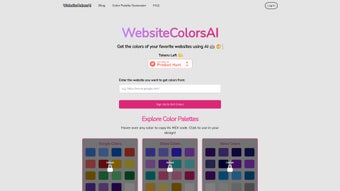
The workflow is intentionally simple: paste a URL, press “Extract,” and the platform instantly presents a visual swatch panel together with HEX, RGB, and HSL codes. In addition to on‑the‑fly extraction, WebsiteColorsAI offers a curated library of popular brand sites, allowing users to explore industry trends without leaving the interface. The tool emphasizes privacy—URL processing occurs client‑side, and no data is retained on the server—while still delivering a free tier that supports unlimited single‑page analyses.
Whether you are crafting a new brand identity, refreshing a UI kit, or building a marketing landing page, WebsiteColorsAI provides a secure, fast, and accurate way to base your color decisions on real‑world examples across Windows, macOS, Android, and iOS browsers.
Key Features of WebsiteColorsAI
- AI‑Enhanced Detection: Machine‑learning models differentiate static CSS colors from runtime‑generated shades, ensuring a comprehensive palette.
- One‑Click URL Input: Paste any web address and receive a full color scheme instantly, without additional extensions.
- Multiple Export Formats: Download palettes as PNG swatch sheets, JSON files compatible with Sketch/Figma/Adobe XD, or as CSS custom properties for immediate use.
- Curated Site Library: Access pre‑built collections from leading brands such as Apple, Spotify, and Airbnb to spark inspiration or benchmark trends.
- Cross‑Platform Accessibility: Fully web‑based and responsive, the tool runs on any modern browser across Windows, macOS, Linux, Android, and iOS.
- Privacy‑First Architecture: All URL analysis is performed locally in the browser; no URLs or color data are stored on remote servers.
- Continuous Model Updates: Regular AI training adds support for emerging design patterns, SVG gradients, and CSS variables.
- Free Tier with Premium Upgrade: Unlimited single‑page extraction is free, while the paid plan adds batch processing, API access, and priority support.
Installation, Usage & Compatibility
Because WebsiteColorsAI is delivered as a SaaS application, there is no traditional installation process. Users simply launch a modern web browser, navigate to websitecolorsai.com, and begin extracting colors immediately. The interface follows responsive design principles, providing an optimal experience on desktop monitors, tablets, and smartphones.
Step‑by‑Step Usage Guide
- Enter a URL: Copy the address of the site you wish to analyze and paste it into the main input field on the homepage.
- Select Extraction Mode: Choose “Static Only” for CSS‑based colors or “Dynamic + Static” to include JavaScript‑generated shades.
- Run the Analyzer: Click the “Extract Colors” button; the AI engine scans the page, parses computed styles, and groups colors by functional role.
- Review the Palette: A visual swatch panel displays primary, secondary, and accent colors. Hover over each swatch to see HEX, RGB, and HSL values.
- Export or Save: Use the “Download” button to export the palette in PNG, JSON, or CSS format, or click “Save to Library” to store it in your cloud‑based account.
System Requirements & Operating Systems
WebsiteColorsAI runs entirely in the browser, making it compatible with any operating system that supports modern web standards. Supported platforms include Windows 10/11, macOS Ventura and later, popular Linux distributions, Android 8.0+, and iOS 13+. The only prerequisites are a stable internet connection and a JavaScript‑enabled browser (Chrome, Edge, Firefox, Safari, or Opera) that supports ES6 features.
Account Options & Security
The free extractor works without an account, but creating a free profile unlocks cloud‑based palette storage and access to the curated site library. All traffic is encrypted with TLS 1.3, passwords are hashed using bcrypt, and premium API keys are scoped with granular permissions to ensure secure integration into CI/CD pipelines.
Conclusion, Pros & Cons, FAQ & Call‑to‑Action
Pros
- Instant, AI‑driven color extraction with high accuracy.
- No installation required; works in any modern browser.
- Generous free tier for unlimited single‑page analyses.
- Multiple export formats cover most design workflows.
- Strong privacy model; URLs are processed locally.
Cons
- Batch processing and API access are limited to the paid plan.
- Dynamic colors that appear after user interaction (e.g., hover states) may be missed.
- Legacy design tools may need manual conversion of exported files.
Frequently Asked Questions
Can WebsiteColorsAI extract colors from password‑protected sites?
No. For security reasons the tool only accesses publicly reachable pages. Premium users can download a page locally and run the offline mode.
Is there an API for automated batch extraction?
Yes. Premium subscribers receive an API key that lets you submit a list of URLs via a REST endpoint and receive JSON‑formatted palettes.
What file formats can I export my palettes to?
Palettes can be downloaded as PNG swatch sheets, JSON files (compatible with Sketch, Figma, Adobe XD), or as plain CSS variables for quick copy‑paste.
Does the free version have usage limits?
The free tier offers unlimited single‑page extractions but caps saved palettes at 20 per account. There are no daily request limits.
How does WebsiteColorsAI ensure color accuracy across browsers?
The AI engine reads the final computed style after the page is rendered, guaranteeing that the extracted HEX/RGB values match exactly what users see on screen.
Ready to streamline your design workflow and tap into the visual DNA of the web’s most successful brands? Download WebsiteColorsAI now, start extracting vibrant palettes for free, and upgrade to the premium plan when you need batch processing or API access. Transform the way you choose colors—make every project look professionally curated in minutes, not hours.



.png)



